AiTM Phishing: Scoring Identity Risk Is Not the Same as Stopping the Session
Your user finished MFA. Entra logged success. Conditional Access did not block the attempt. Minutes later, someone else was using that identity.
That is adversary-in-the-middle (AiTM) phishing as most identity teams meet it: a reverse proxy in the live authentication exchange, capturing the session material the provider just issued, then replaying it from attacker infrastructure. Multifactor authentication still matters. It is not the whole defense. Identity threat detection and response (ITDR) has to score what happened around that login, drive a response, and prove which access actually stopped.
Scoring an identity is not the same outcome as stopping a session.
What AiTM phishing is
AiTM phishing is reverse-proxy phishing against the authentication flow. The attacker is present during authentication, not only afterward.
- The user opens a convincing login link that points at the attacker’s proxy, not at your real sign-in host.
- The proxy relays the authentication exchange to the real identity provider and back to the user.
- The user completes whatever factors the provider requires, often including MFA.
- The provider issues session material for a successful authentication.
- The proxy captures that material and the attacker replays it from their own network.
From the identity provider’s perspective, the interactive login can look legitimate. The password and MFA challenge were real. The token was issued under normal policy. What failed is the assumption that a successful authentication equals a trustworthy ongoing session.
Classic credential phishing steals factors for a later login attempt. AiTM targets the live exchange and the session that exchange produces. For phishable MFA methods, AiTM does not crack the MFA challenge. It waits for the user to complete MFA through the proxy, then steals the resulting session.
MFA is not one thing
Phishable MFA (passwords plus SMS, voice, email one-time codes, or many push-based flows) can be completed through a reverse proxy. The user thinks they are signing in to your tenant. They are completing a real challenge while the attacker sits in the middle and receives the session.
Phishing-resistant MFA, properly enforced (especially FIDO2 / passkeys registered to the legitimate relying party), is different. Passkeys use origin-bound public-key cryptography and provide verifier impersonation resistance: the authenticator will not complete the ceremony for an attacker’s fake domain the way it will for the registered relying party. In the Microsoft Entra passkey flow, Entra sends a challenge to the authenticator; the user unlocks the private key with a biometric or PIN; the authenticator signs the challenge and returns a signature; Entra verifies that signature with the stored public key and then issues a token. The private key is not disclosed to the website. Source: Microsoft: Passkeys (FIDO2) in Entra ID
That closes the standard fake-host reverse-proxy path. It does not end identity risk. After phishing-resistant credentials force attackers off easy remote phishing, token theft and session abuse remain practical paths: malware on the endpoint, theft from a compromised browser, and replay of already-issued tokens. Source: Microsoft: Understanding tokens in Entra ID
Push phishing-resistant MFA where you can. Enforce it with Conditional Access authentication strengths where licensing allows. Still monitor and contain sessions after issuance.
What to watch (and what the logs support)
Useful investigation themes after a successful interactive sign-in:
- Context mismatch: device, ASN, user agent, or app usage that diverges from the interactive MFA context and baseline.
- Suspected session or refresh-token replay: unusual token characteristics or reuse patterns consistent with Microsoft’s anomalous-token risk class, not a claim that “the same token string appeared in two places.”
- Geographic discontinuity that does not fit travel time (treat VPN and shared egress as confounders).
- Non-interactive activity with careful IP interpretation: for confidential-client non-interactive sign-ins, Microsoft documents that the logged IP may reflect original token issuance, not the refresh request’s source IP. A simple interactive-vs-noninteractive IP comparison is not proof of replay. Source: Microsoft: Non-interactive sign-in logs
- MFA method changes or suspicious OAuth consent soon after a risky session.
Individual signals do not prove AiTM. They create a case for correlation. For the query-level work of finding these patterns in your own logs, see our companion guide on how to detect AiTM phishing attacks.
Microsoft Entra ID Protection already ships related detections, including unfamiliar sign-in properties, anomalous token, atypical/impossible travel (with licensing differences), and an offline Attacker in the Middle user risk when a session is linked to a malicious reverse proxy (Microsoft 365 E5 / EMS E5 requirements as documented). Those controls matter and should be on where you pay for them. The remaining question is whether your program can correlate hybrid sequences, explain the chain, execute containment, and show which access stopped. Source: Microsoft: Risk detections
What ITDR has to prove
- Score the identity event and the session sequence, not only “MFA passed.”
- Produce a decision: Allow, Monitor, Investigate, or Block, according to policy.
- Execute revocation and related containment through the identity platform and response process.
- Verify a defined scope of access actually stopped: which principal, which refresh/session material, which applications, and which evidence you checked.
A successful revoke API call means the request succeeded. It does not, by itself, prove every application session became unusable. Microsoft distinguishes Entra-issued tokens from application session cookies the application controls. Access tokens commonly remain usable until expiry (default lifetime is a random value between 60 and 90 minutes, longer for some Continuous Access Evaluation sessions) unless the resource can invalidate sooner. Sources: Microsoft: Revoke user access in an emergency, Microsoft: Configurable token lifetimes
How MILBERT works in that progression
MILBERT is ThreatHunter.ai’s Agentic AI-powered identity threat detection and response capability for AiTM phishing, session hijacking, and token replay around logins the identity provider records as successful. Version 2.1 adds continuous user-behavior tracking across hybrid Active Directory and Microsoft Entra ID. It scores the principal, the session, and the sequence around both. A completed MFA challenge is not treated as proof that the person behind the credential remains in control.
The pipeline is four stages. Scoring and reasoning are separate from enforcement.
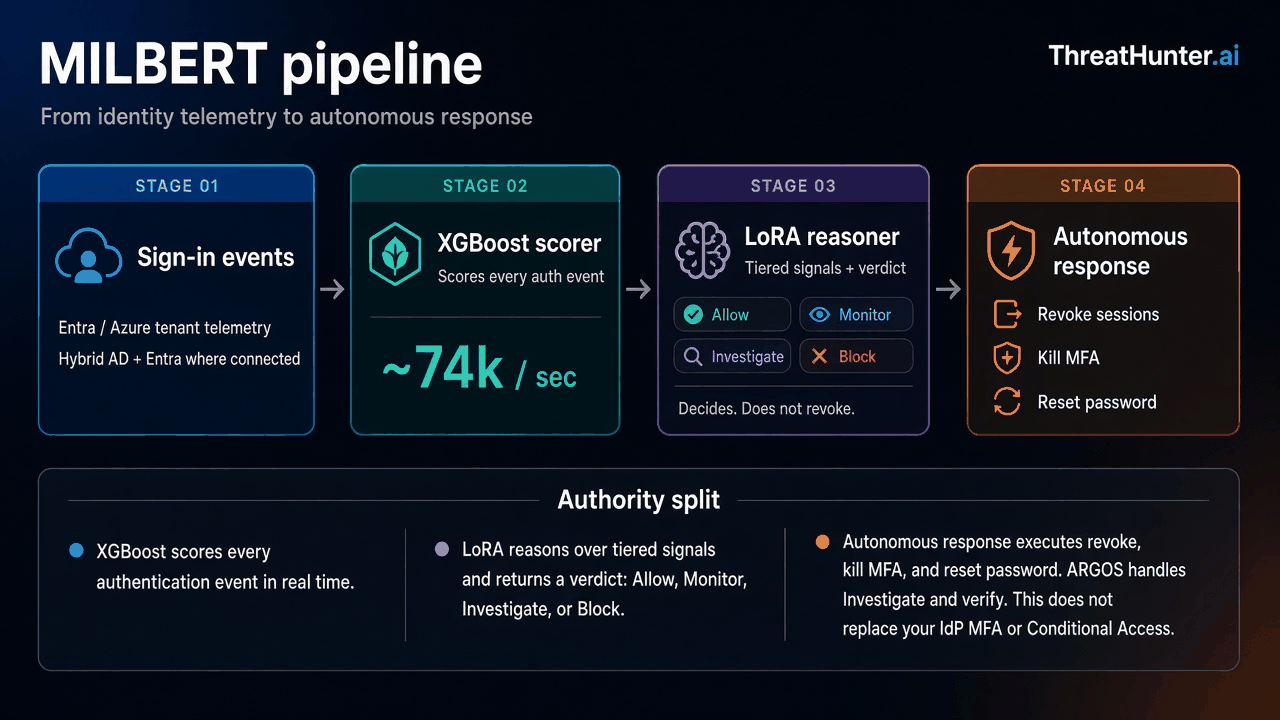
MILBERT pipeline: sign-in events to XGBoost scorer to LoRA reasoner to autonomous response
What each stage owns
- Sign-in events. Identity telemetry from the customer’s Azure / Entra tenant (and hybrid AD where connected) feeds MILBERT as authentication and session activity, not as a replacement for the IdP login page.
- XGBoost event scorer. Scores every authentication event. On infrastructure ThreatHunter.ai owns and operates, a single MILBERT 2.1 instance scores more than 74,000 events per second (as stated in the 2.1 release notes).
- LoRA sequence reasoner. Applies tiered signals across a window of events and issues a verdict with rationale: Allow, Monitor, Investigate, or Block. This stage decides. It does not revoke. Per the 2.1 release notes, the language model does not revoke sessions or change directory state.
- Autonomous response. Approved high-risk verdicts drive automated containment: revoke sessions, kill MFA, and reset the password. Investigate-tier cases, and verification that a defined scope of access actually stopped, still involve ARGOS hunters when the customer is on managed hunting.
MILBERT does not replace the identity provider, MFA, or Conditional Access. It sits on their telemetry, scores and reasons over the sequence, then acts through the response stage (and hunters when the verdict calls for investigation).
What MILBERT adds beside Entra risk detections
- Hybrid AD and Entra sequence analysis when the path is not cloud-only.
- Per-event XGBoost scoring plus LoRA attack-chain rationale tied to Allow / Monitor / Investigate / Block.
- Autonomous response for approved Block paths (revoke sessions, kill MFA, reset password), with ARGOS follow-through for Investigate and verification.
- A regulated scoring path on infrastructure ThreatHunter.ai operates for customers who cannot send identity telemetry to public-cloud AI services (as described in the 2.1 release notes).
Containment that matches Microsoft’s order
When evidence is credible:
- Reset the user’s password first. Use a secure password reset. In hybrid environments, reset the on-premises password (Microsoft recommends resetting twice when pass-the-hash and replication delay are concerns), then sync. Remove and reissue app passwords separately; a directory password reset does not revoke them automatically. Sources: Microsoft: Respond to a compromised email account, Microsoft: Revoke user access in an emergency
- Revoke Entra sign-in sessions / refresh tokens, and disable registered devices when appropriate.
- Audit MFA methods, OAuth grants, inbox rules, unusual app consent, and hybrid directory changes.
- Verify a defined scope: for example, confirm refresh tokens for that principal no longer mint new access tokens; spot-check critical apps for surviving application sessions; confirm no successful attacker reuse in the window after revoke. Absence of new interactive sign-ins alone is not proof that an existing app session died.
- Recover with phishing-resistant re-enrollment where needed, then re-enable under controlled conditions.
Microsoft retired configurable refresh and session token lifetimes through token lifetime policies, so those knobs are no longer available for shortening session risk. The control that still governs how often users must reauthenticate is Conditional Access sign-in frequency. Access-token lifetime policies remain available for some scenarios, and default access-token lifetimes are typically a random value between 60 and 90 minutes unless Continuous Access Evaluation extends the session. Source: Microsoft: Configurable token lifetimes
What to do next
- Enforce phishing-resistant MFA for admins and high-risk users; keep Conditional Access authentication strengths tight.
- Use Conditional Access sign-in frequency and Continuous Access Evaluation where supported; refresh and session token lifetimes are no longer configurable through token lifetime policies.
- Staff the Entra / Defender identity detections you already pay for, and add continuous monitoring that finishes password reset, session revocation, and scoped verification.
- Keep your IdP. ITDR sits beside MFA and Conditional Access.
If you want to see this end to end in your own Entra or hybrid AD environment, we will walk the successful authentication, the signals that raised risk, the MILBERT verdict, the autonomous response or ARGOS action that followed, and the evidence that a defined set of access stopped, including elapsed time from suspicious activity through enforcement delay. Start at threathunter.ai/milbert.
FAQ
Does MILBERT replace Conditional Access or MFA?
No. MILBERT sits on your IdP telemetry. The LoRA reasoner issues Allow / Monitor / Investigate / Block and does not itself rewrite the directory. The autonomous response stage executes approved containment (revoke sessions, kill MFA, reset password). ARGOS hunters handle Investigate paths and verification. Your IdP, MFA, and Conditional Access remain in place.
What should we do first when we suspect token theft?
Reset the user’s password first (on-premises twice if hybrid, per Microsoft’s guidance), then revoke Entra sessions / refresh tokens, then address devices, OAuth grants, app passwords, and application sessions. Verify a defined scope of access actually stopped.