Browser-in-the-Browser Attacks Are the New Phishing Kit
For years we've told everyone the same thing: check the URL. Browser-in-the-Browser (BitB) attacks make that advice useless. The URL looks perfect because the entire browser window is fake. A pixel-perfect replica built with HTML and CSS, rendered inside an attacker-controlled page.
What BitB Actually Is
A BitB attack is design deception. The attacker builds a pixel-perfect authentication pop-up — browser frame, padlock, and a "legitimate" URL — all drawn inside the page itself. Users think they're signing in with Google, Microsoft, or Facebook. In reality, they're typing directly into the attacker's page.
There is no pop-up. There is no separate window. It's a div.
Why These Attacks Are Surging
Starting in late 2025 and accelerating through early 2026, BitB campaigns spiked hard. The lures are predictable: fake legal notices, account violation warnings, shared cloud documents that look just real enough to click. Attackers route traffic through clean, reputable hosting infrastructure and shortened links — making the initial URL look harmless.
The technical side is what makes these kits dangerous. Fake CAPTCHA gates add a layer of credibility. Some kits now include real-time session relaying, which means the attacker can hijack a session the moment the user completes MFA. The playbook is simple: create urgency, disguise the link, serve a fake login that's indistinguishable from the real one.
Why Your Security Stack Misses It
Traditional defenses are built around URL inspection and malicious redirects. BitB bypasses both.
- Email defenses see clean domains with no obvious malicious indicators.
- Endpoints see JavaScript and HTML rendering a fake window. Nothing inherently suspicious.
- URL inspection passes because the parent page's URL is legitimate. The fake login lives entirely inside the tab.
By the time any of these layers would normally trigger, the user is already staring at a convincing login prompt.
How Users Can Actually Detect It
Let's be honest about what we're asking here. The user already clicked the link. They already landed on the attacker's page. And now we're counting on them to be the last line of detection.
That's the reality of BitB. By the time it matters, the user is already in the kill chain and every other layer has failed. There are two checks that can still catch it:
Drag Test. Try dragging the login pop-up beyond the browser boundaries. A real pop-up detaches from the page. A BitB window stays trapped inside the tab. If it can't leave the browser, it isn't a real window.
Password Manager Test. If your password manager doesn't autofill, something is wrong. Password managers check the actual domain, not what's drawn on screen. No autofill is a hard signal.
When in doubt, close the tab. Open a new one. Navigate to the login page yourself.
The Demo: How It Plays Out
The HR account at a mid-size company has been compromised. The attacker sends a wave of internal phishing emails that look like they came from HR. The lure: a retention document. Submit it, or risk getting laid off.
Alex Martin gets the email. It's marked as an external sender, but it matches a thread Alex has already been part of — budget constraints, staffing reviews. Alex loves their job. They don't want to be on the list.
Step 1: The email arrives.
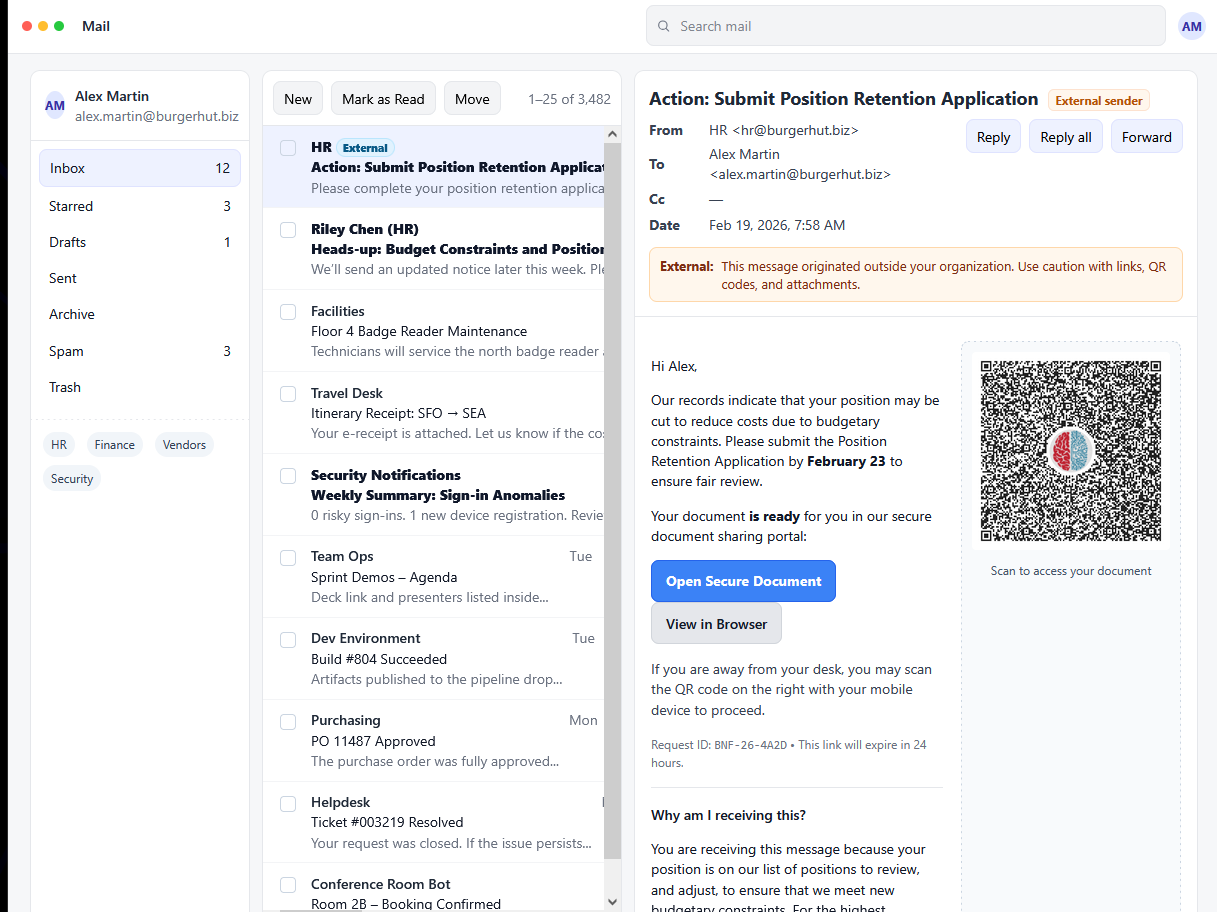
The phishing email landing in Alex's inbox — note the "External sender" warning and the urgency-driven lure.
Alex clicks the link. The "External sender" warning doesn't register. The content matches what HR was already talking about. The urgency is real enough to act on.
Step 2: The fake document portal.
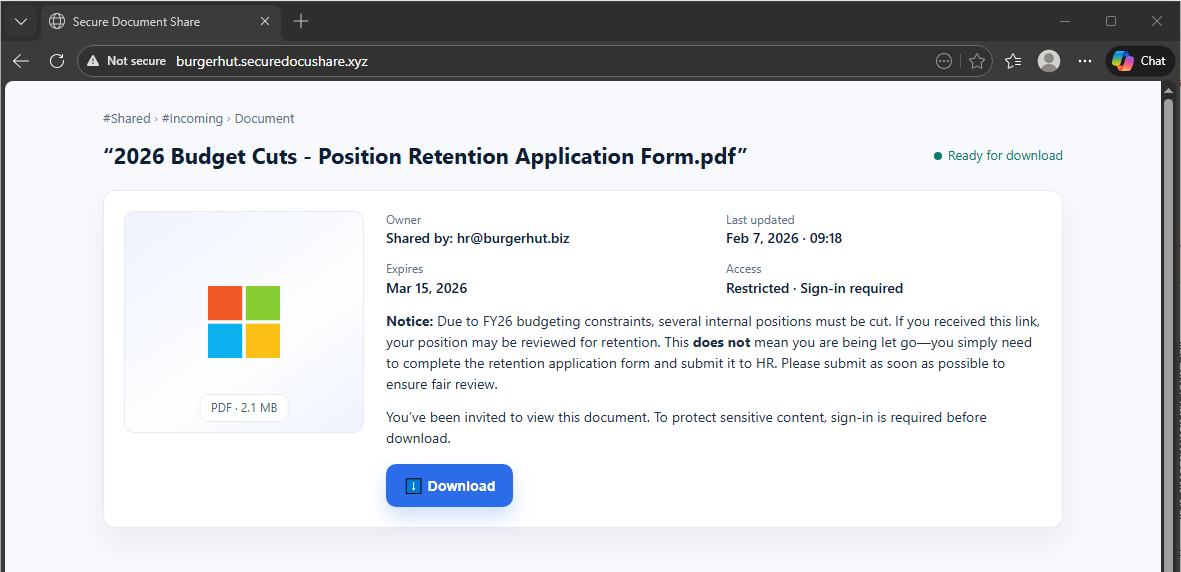
The attacker-controlled document sharing page at burgerhut.securedocushare.xyz — "Not secure" in the URL bar, but Alex isn't looking there.
The page looks like a corporate document sharing portal. The branding is clean. The document is right there. The URL bar shows "Not secure" — but Alex isn't looking at that. Alex is looking at the document.
Step 3: The fake login prompt appears.
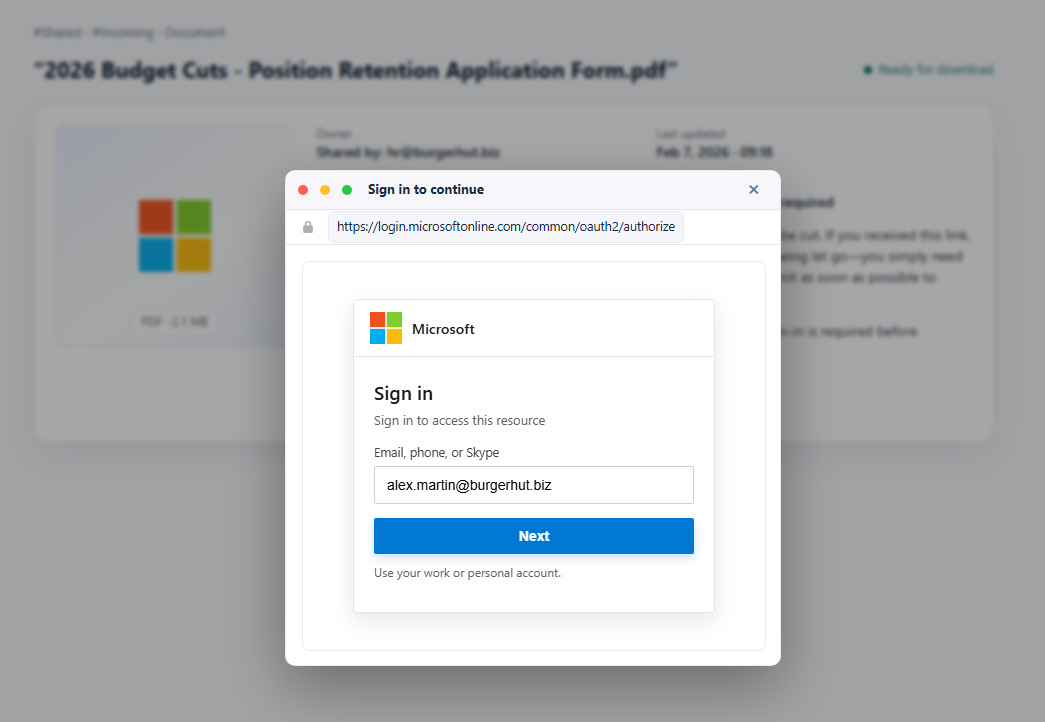
The BitB fake Microsoft login popup overlaying the document portal — pixel-perfect branding, legitimate-looking URL in the pop-up address bar.
Clicking download triggers a Microsoft sign-in prompt. Familiar branding. Legitimate-looking URL in the pop-up's address bar. Nothing feels out of place.
Step 4: Password entry.
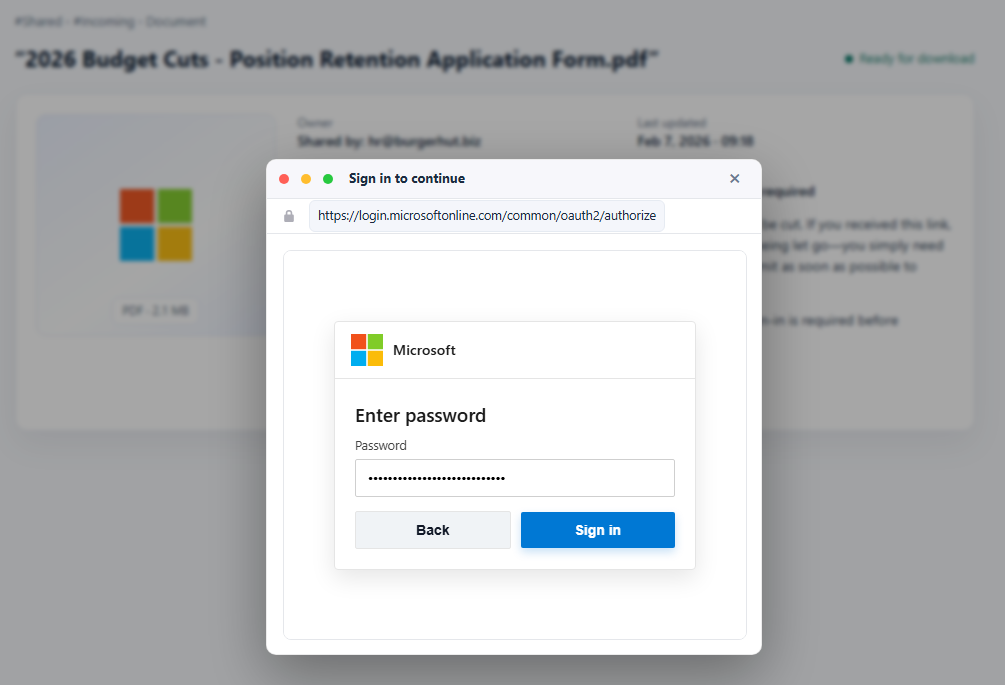
Password entry step of the fake Microsoft login — the form accepts credentials and the flow continues normally.
Alex enters their password. The form accepts it. The flow continues exactly as expected.
Step 5: The CAPTCHA.
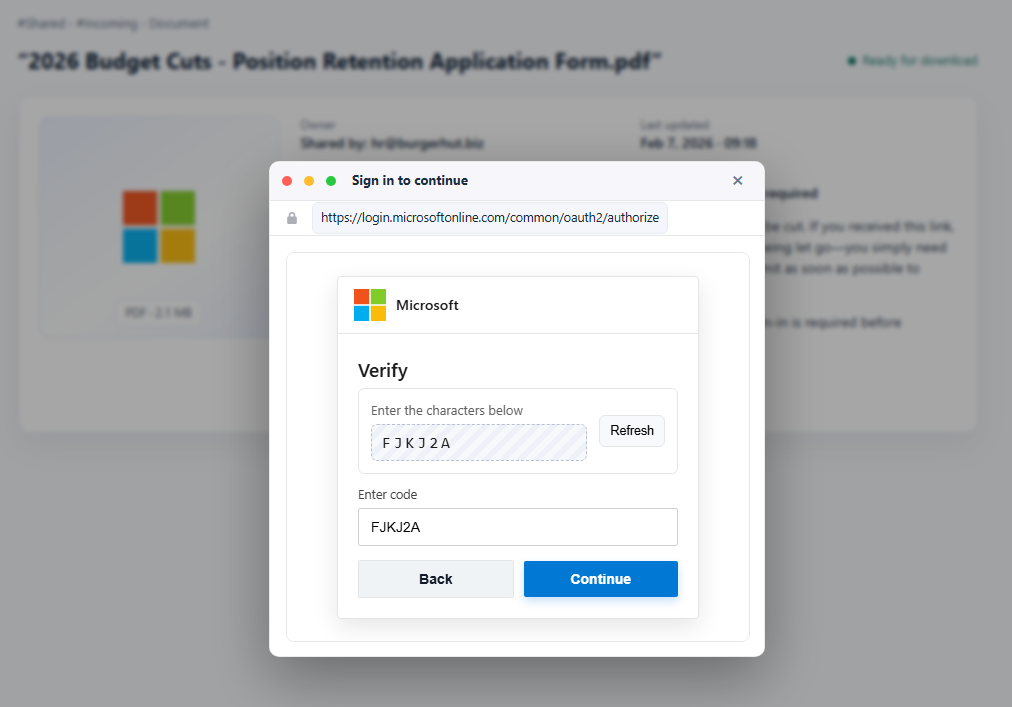
Fake CAPTCHA step used to add credibility and slow the victim down — a normal friction point that makes the attack feel legitimate.
A CAPTCHA appears. Annoying, but normal. Alex completes it.
Step 6: Session captured.
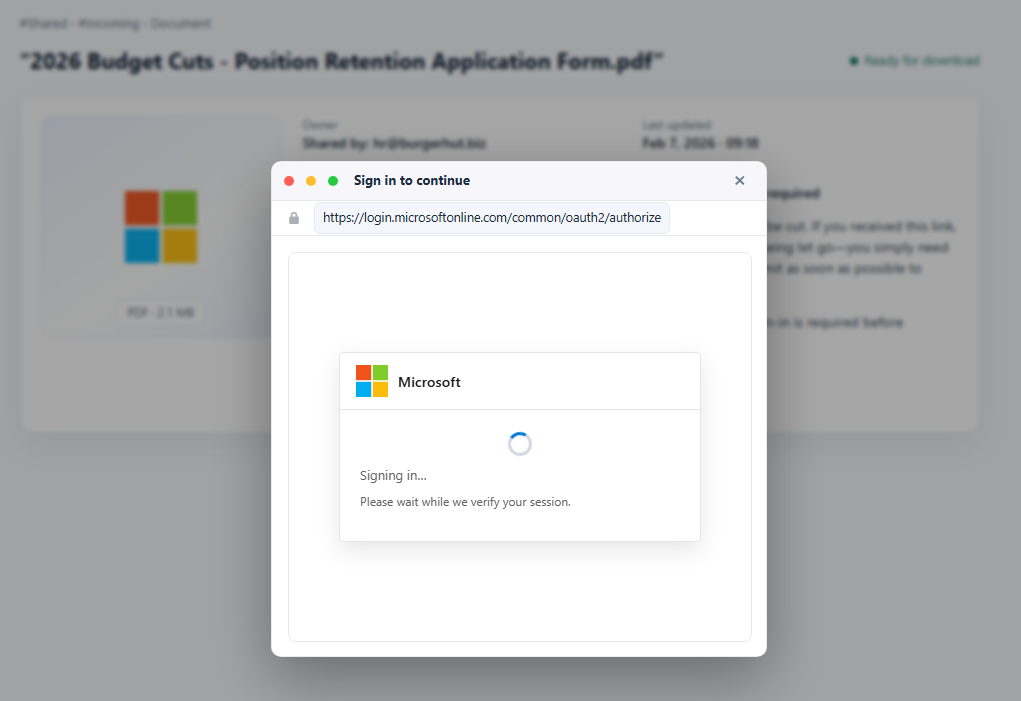
"Signing in... Please wait while we verify your session." — that spinner is relaying Alex's session token to the attacker in real time.
"Signing in... Please wait while we verify your session."
That spinner isn't authenticating Alex. It's relaying the session token to the attacker in real time. Account compromised.
What Alex missed:
No password manager. No autofill prompt. No automatic domain check. A password manager would have flagged the mismatch immediately — the pop-up claimed to be login.microsoftonline.com but the actual page domain was something else entirely.
No drag test. The login window moved around the screen fine. It felt real. But here's what happens when you try to drag it outside the browser:
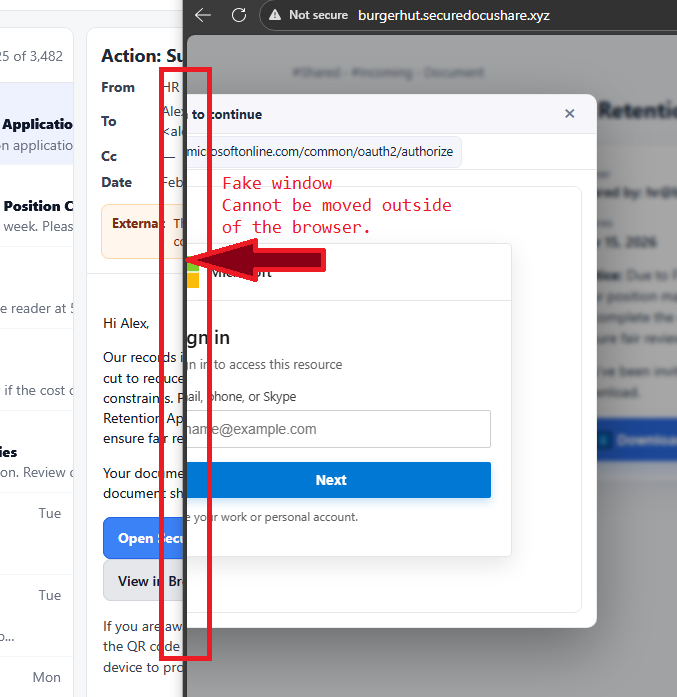
The drag test — the fake login window cannot leave the browser boundaries. It hits the edge and stops. That's the tell, every time.
It can't leave. It hits the edge and stops. That's the tell. Every time.
What Defenders Must Monitor
Even when BitB succeeds, it can't hide the aftermath. Compromise shows up in identity telemetry:
- Logins from new ASNs or cloud datacenter infrastructure
- Impossible travel and behavioral drift
- Session tokens reused from unfamiliar devices or locations
- Browser fingerprint and device profile anomalies
The credential theft happens in the browser. The attacker's mistakes happen in the logs.
What You Should Do Now
- Roll out a two-step user check. Drag test plus password manager test. Make it muscle memory.
- Push passkeys and WebAuthn wherever you can. BitB attacks collapse when credentials aren't reusable. Phishable credentials are the root problem.
- Strengthen identity-based detection. Alert on token reuse, impossible travel, new ASNs, and browser drift. The post-auth window is where you catch this.
- Hunt proactively. Look for campaigns using clean hosting and shortened links in your mail logs and web telemetry. The infrastructure patterns are detectable before victims click.
The attack is clever. The detection is not complicated. Get the basics locked in, and make sure your identity monitoring is watching for what comes after the login, not just the login itself.